Contact Us

Support Articles

Product Downloads

Sales Information


My Agency Advantage

What's New

Company Downloads

ACORD Forms

Monthly Newsletter


WebMerge


This feature allows you to map data from the current customer and policy on to  web pages. It will allow you to move more quickly through web sites and save a lot of typing.   The web browser window that opens will have information specific to the policy from which it started. When you exit the policy in AA, the associated browser window will close.

Below is a simple non insurance related example of how this feature works.


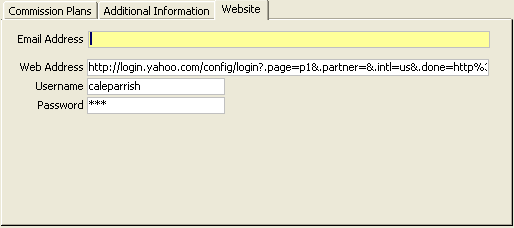
Using cut and paste,  we have set up the Yahoo login page as the web address on the company set up screen in AA. A username and password have also been set up.
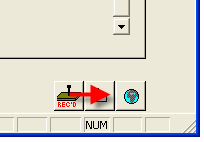
Next, a browser is launched from a policy for this company.

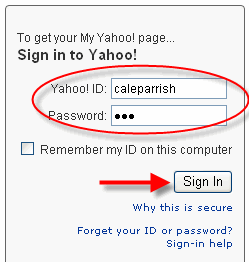
Notice the login info has already been entered.

So, how did the browser know the correct values for these input boxes?

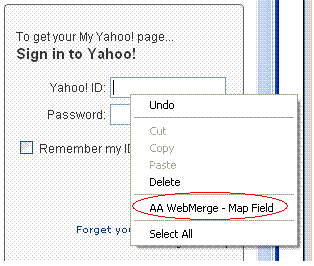
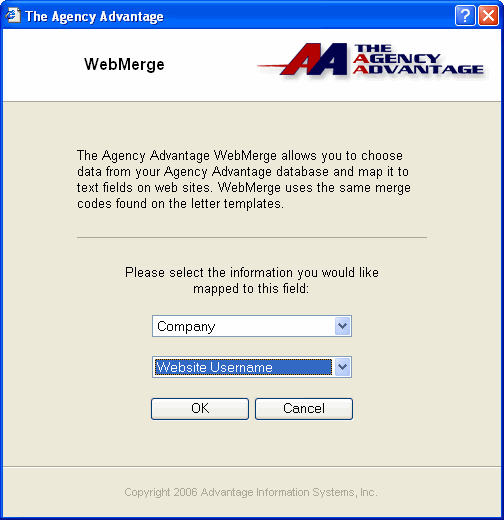
 Right-Click any input box on a web page and choose the Map Field option.

The following screen appears:
Select the appropriate data from the available lists and click OK.

Your data is now mapped to the input box on this web page.

Set it up one time and it will work on all the computers in your office.


© 2010 Advantage Information Systems, Inc. All Rights Reserved. Call The Agency Advantage at 1.800.442.5447