Support Articles

Product Downloads

Sales Information


Company Downloads

ACORD Forms


Premium Financing Specialists
Web Integration

Integration Installer
Download


File Size: 352kb


Before You Begin

Before running the installer, Premium Financing Specialists must be added to The Agency Advantage as one of your companies.

From the Main Menu choose System Setup then Insurance Companies. From there you can simply add a company with the desired information.


Installation

Installing the PFS Web Integration package is the first step in automating your premium financing. Click the download link above and choose `Run`. You will then be presented with an installer.

Once the installer has completed you will be presented with a window, shown below, where you can enter your PFS login credentials.


Obtaining A Quote

After successfully completing the setup, you may now open The Agency Advantage. You will notice a new button on the Customer Folder under the Policies Tab. (Shown Right)


Clicking this button will bring up a dialogue box where you may choose one or more policies, from the list of active policies, to submit to PFS for a financing quote.
(Shown Below)
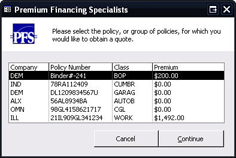


Once you have selected those policies, click Continue. A new browser window will open and your financing worksheet will be populated with information from The Agency Advantage.


Account Status

A policy where Premium Financing Specialists is selected as the finance company will display an additional PFS Account Status button.


© 2010 Advantage Information Systems, Inc. All Rights Reserved. Call The Agency Advantage at 1.800.442.5447